 CompareMyDrafts
Live side-by-side diff
See edits as you type. No upload, no wait.
See exactly what changed between your drafts — side by side, in your browser. Your text stays there unless you turn on encrypted sync. Built for novelists, editors, and anyone who revises.
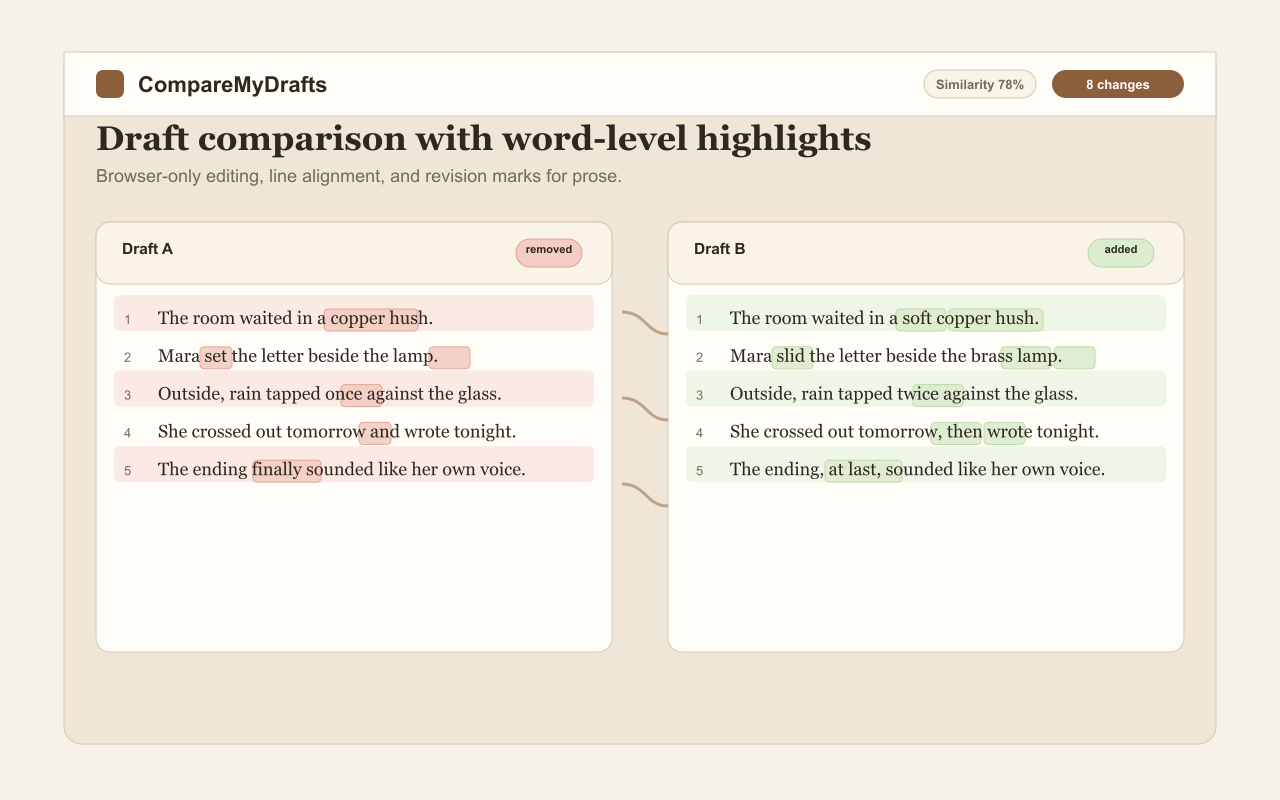
See edits as you type. No upload, no wait.
Exactly which words changed, not just which lines.
Your draft text stays in your browser unless you turn on encrypted sync.
Save named versions of any draft, reload into either pane.
Install on phone or desktop. Write anywhere.
HTML, PDF, EPUB, clipboard. Take your edits anywhere.
Create an account to sync drafts across your devices. Even we cannot read them.
Drop in your original and revised text.
Word-level highlights show exactly what moved, added, or vanished.
Click the arrows on the divider to copy any change between drafts.
CompareMyDrafts is being built into a full writing tool. Here's what's next.
Yes, the comparison features are free today. Advanced features still in development (AI editing, .docx export) will be available on a paid tier when they launch. Cloud sync is available now — create a free account to sync encrypted drafts across your devices. Everything currently shipped works at no cost.
No, not by default. Your draft text stays in your browser and the diff happens entirely on your machine — unless you turn on encrypted cloud sync, which stores an end-to-end encrypted copy so we cannot read it. We do collect limited, sanitized usage events via privacy-preserving analytics (page views, button clicks, never your text), and we use an email provider for a voluntary waitlist signup. All of this is disclosed in our Privacy Policy.
Today, you paste text into the panes. Direct .docx upload and tracked-changes export are on the roadmap and will be a paid feature when they ship.
Yes. It's a Progressive Web App. Install it on your phone or desktop and it works without an internet connection. Your snapshots and drafts persist locally in your browser.
Most diff tools are built for developers — line-by-line code comparison with monospaced fonts. CompareMyDrafts is built for writers — prose-friendly typography, word-level highlighting, save/restore named versions of your drafts, and an export pipeline that includes EPUB for fiction writers.
Today, you can export the diff as HTML or PDF and email it. Shareable read-only links are on the roadmap.
A focused markdown editor with live preview and a distraction-free freewrite mode are both available now — open them from the Write & edit and Freewrite links. Still in development: deeper editing with structural feedback alongside the comparison view, and AI-assisted editing (send a selection to AI, see the revision in the opposite pane). Sign up via the form above to be notified about what's next.
Yes. It's installable as a mobile app on Android and iOS via "Add to Home Screen". Designed mobile-first.
Yes. Use snapshots to save named versions of either pane. Reload any snapshot into either side anytime. Free, unlimited.
CompareMyDrafts is an indie project built by a writer who got tired of comparing chapter drafts in Microsoft Word's broken track-changes view. Reach out at hello@comparemydrafts.com — or for privacy/data requests, privacy@comparemydrafts.com.